Talk to your Tableau dashboards.
Trust every answer.
Conversational AI built specifically for Tableau — with native Row-Level Security, full audit transparency through Events mode, and your own LLM API keys. No data retention, no vendor lock-in, no schema hallucinations
-
 Works with entire dashboards — not just single worksheets
 - Works with Tableau Server 2025.1+ and Tableau Cloud
- Bring your own Anthropic or Deepseek API key
- Session-only history — nothing stored on our servers

Get Tableau AI Assistant
Download the .trex file and start querying your dashboards in minutes.
By clicking «Download», you agree to the processing of your personal data. We use it to stay in touch. Learn more
The Problem
Generic AI tools weren't built for your dashboards
You've seen the demos. ChatGPT writing SQL. Claude analyzing your spreadsheet. They look impressive — until you try to deploy them on a real dashboard your team actually uses. Then the problems start.
-

Schema hallucinations
The AI invents fields that don't exist, misinterprets formulas, and confidently produces wrong numbers. There's no way to verify what it actually did. -

Security tradeoffs
Most AI tools send your raw data to third parties, ignore your Row-Level Security, or require new vendor relationships your procurement team hasn't approved. -

Engineering overhead
Custom MCP integrations take weeks of work and still leave you managing API keys, audit logs, and access controls yourself.
Tableau AI Assistant was built to solve all three — without asking your security team to compromise.
TRY extension YOURSELF
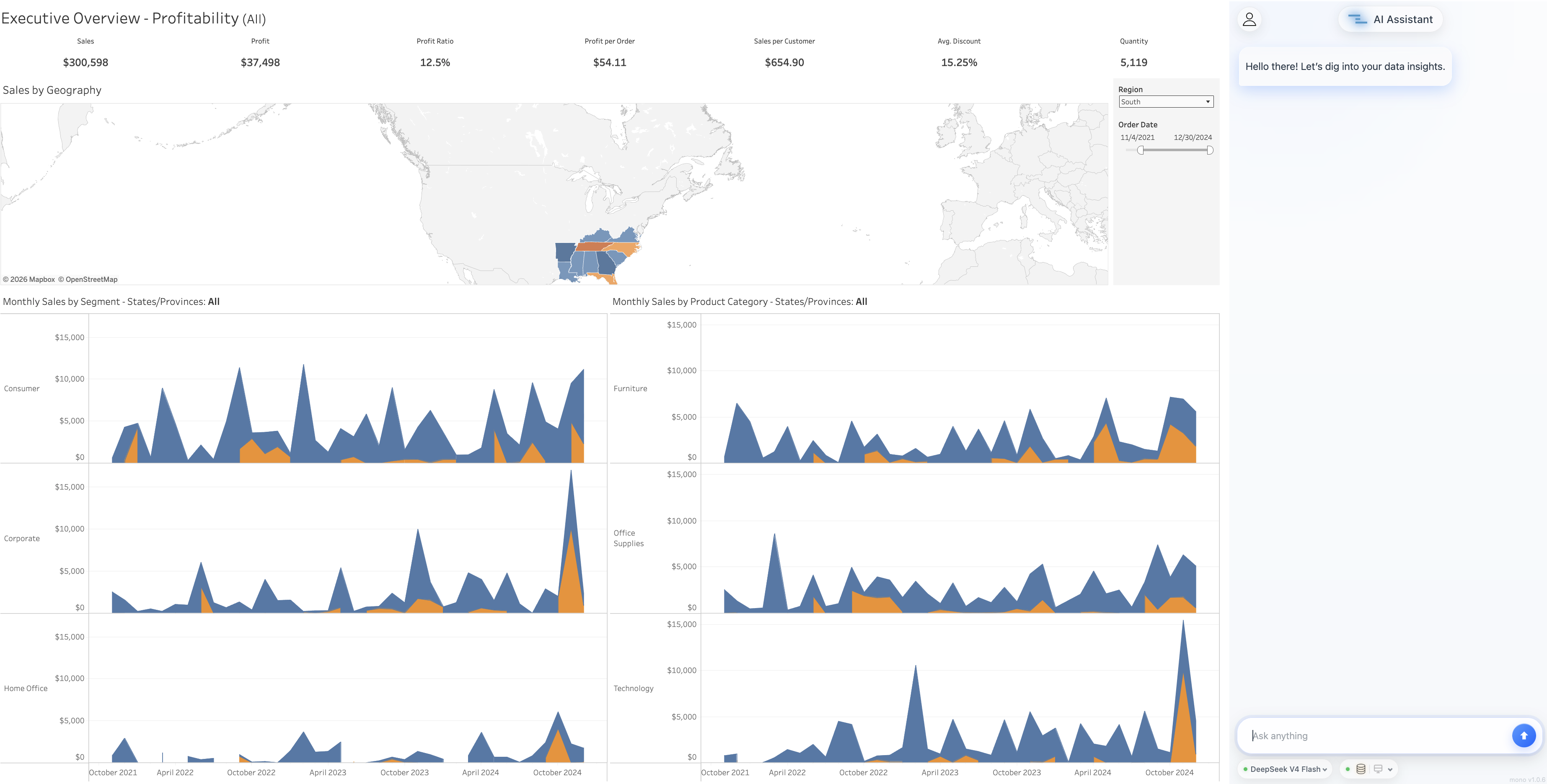
Try AI Assistant on a Sample Dashboard
See how Loupe helps reduce repetitive KPI investigations and keeps analysis inside Tableau
how it works
Three steps. Five minutes
Download
Get the .trex file from our website and drag it onto any dashboard. No deployment, no admin involvement, no IT tickets.
Connect
Enter your Tableau Personal Access Token and your LLM API key (Anthropic Claude or Deepseek). Both stored locally in your browser.
Ask
Type any question in natural language. The extension queries Tableau on your behalf, applies your permissions, and returns a verifiable answer.

special features
Why Tableau AI Assistant
Key advantages that make data analytics simple, secure, and transparent
Full-dashboard scope
The extension works with the entire dashboard — not just a single worksheet. Ask questions that span multiple charts, filters, and parameters. Tableau Agent is limited to worksheets.

Native RLS support
Uses your Tableau Personal Access Token (PAT). Row‑Level Security applies automatically — users see only their data.

Events mode (full transparency)
Inspect every step: the exact VizQL query, returned data, LLM prompt, and raw model response. No black box.

Multiple LLM connectors
Already supports Claude and Deepseek. More providers coming soon. No vendor lock‑in.

Bring your own key (BYOK)
Use your own API key. Pay your LLM provider directly — no markup, no hidden fees.

Built for Tableau Server first
Enterprise‑ready. Full support for Tableau Server 2025.1+ (Cloud also supported).

Principles
Built on three principles your security team can verify
Pillar 01
Audit-grade transparency with Events
Every answer can be inspected in full. Toggle Events mode and see exactly what happened: the query sent to Tableau, the data that came back, the prompt sent to the LLM, and the model's raw response. No black box. No «trust us.» Just verifiable output at every step.
This isn't a debugging feature for engineers — it's a trust feature for everyone. Your CFO can verify a number before quoting it in a board deck. Your security team can audit data flow without a forensic investigation.
Audit-grade transparency with Events
Every answer can be inspected in full. Toggle Events mode and see exactly what happened: the query sent to Tableau, the data that came back, the prompt sent to the LLM, and the model's raw response. No black box. No «trust us.» Just verifiable output at every step.
This isn't a debugging feature for engineers — it's a trust feature for everyone. Your CFO can verify a number before quoting it in a board deck. Your security team can audit data flow without a forensic investigation.

-
Pillar 02
Native Row-Level SecurityThe extension uses your Tableau Personal Access Token to query data on your behalf. This means Row-Level Security defined in Tableau applies automatically — no separate permission model to maintain, no risk of users seeing data they shouldn't.
If a regional manager can only see her region's data in the dashboard, she will only see her region's data through the AI. The architecture makes it impossible to bypass.

Pillar 02
Native Row-Level Security
The extension uses your Tableau Personal Access Token to query data on your behalf. This means Row-Level Security defined in Tableau applies automatically — no separate permission model to maintain, no risk of users seeing data they shouldn't.
If a regional manager can only see her region's data in the dashboard, she will only see her region's data through the AI. The architecture makes it impossible to bypass.
Native Row-Level Security
The extension uses your Tableau Personal Access Token to query data on your behalf. This means Row-Level Security defined in Tableau applies automatically — no separate permission model to maintain, no risk of users seeing data they shouldn't.
If a regional manager can only see her region's data in the dashboard, she will only see her region's data through the AI. The architecture makes it impossible to bypass.
-
Pillar 03
Bring your own LLMYour AI vendor relationship stays with you. We don't resell LLM access, we don't charge per-token, we don't lock you into a single provider.
Use your existing Anthropic Claude or Deepseek API key. Your usage shows up on your bill, governed by your existing terms with that provider. If your organization has an enterprise agreement with Anthropic, that agreement applies — we're just the integration layer.
Pillar 03
Bring your own LLM
Your AI vendor relationship stays with you. We don't resell LLM access, we don't charge per-token, we don't lock you into a single provider.
Use your existing Anthropic Claude or Deepseek API key. Your usage shows up on your bill, governed by your existing terms with that provider. If your organization has an enterprise agreement with Anthropic, that agreement applies — we're just the integration layer.
Bring your own LLM
Your AI vendor relationship stays with you. We don't resell LLM access, we don't charge per-token, we don't lock you into a single provider.
Use your existing Anthropic Claude or Deepseek API key. Your usage shows up on your bill, governed by your existing terms with that provider. If your organization has an enterprise agreement with Anthropic, that agreement applies — we're just the integration layer.

Live Demo
See it in action
Ready to try?
Download in under a minute. No credit card, no sales call, no IT approval needed.
Use Cases
For teams that need answers, not analysts on demand
For BI Teams
“My team gets the same questions 50 times a week. Now they don't have to.”
Reduce the load of ad-hoc requests. Business users can self-serve common questions while your team focuses on real analytics work.
For Business Users
“I needed an answer before a 9am meeting. I got it in 30 seconds.”
Ask your dashboards in plain English. No SQL, no filter dragging, no waiting for an analyst.
For Tableau Admins
“I needed to add AI without losing control. This was the only option that fit our policy.”
Deploy AI into dashboards without compromising on Row-Level Security, without new vendor agreements, without losing visibility.
Architecture & Security
For your security team
Every layer of data flow, documented. Every claim, verifiable.
Tableau AI Assistant
PAT + API key in local storage
Tableau MCP
Tableau Server / Cloud
Native PAT auth, RLS enforced
LLM provider
Your account
-
No persistent storage of user data
Credentials and query data are processed in-memory only and discarded after each request. -
TLS 1.2+ end-to-end
All transit is encrypted between extension, Tableau MCP, Tableau, and the LLM provider. -
Native Tableau permissions
All Tableau access goes through the user's PAT; RLS applies automatically. -
No model training on user data
We do not use any user data to train any models, full stop. -
Session-only conversation history
Conversation context exists only in the user's browser session. -
Auditable in real-time
Events mode shows every step of every request.
Pricing
Free now. Premium features coming soon
Everything you need to deploy conversational AI on any Tableau dashboard
Free
- ✔️ Natural Language Query
- ✔️ Conversational Drill-Down
- ✔️ Events mode
- ✔️ Bring your own LLM key (Anthropic or Deepseek)
- ✔️ Session-only history
- ✔️ Email support
Waitlist now. Early-bird pricing for the first 100 teams
PRO
- ✔️ Everything in Free
- ✔️ Persistent chat history across sessions
- ✔️ Shared prompts within your team
- ✔️ Team workspace and admin controls
- ✔️ Priority support with SLA
- ✔️ Additional LLM providers (GPT-4o, Gemini, Llama 3)
- ✔️ Early access to new features
Frequently asked Questions
Tableau Server 2025.1+ or Tableau Cloud.
Yes — those are your accounts. We don't mark up or resell LLM access.
No. We never use any user data to train any models.
Each user provides their own PAT. RLS applies per user — automatically.
Natively. The extension uses your Tableau PAT, so RLS defined in Tableau applies directly.
Yes — early access will be available for waitlist members.
Still have questions ?
We‘re here to help
By submitting this form, you agree to our Privacy Policy. We will use your email only to respond to your inquiry.